
A PoE (Power over Ethernet) security camera system runs power and video over a single Ethernet cable to each camera. The cameras connect to a network video recorder (NVR) or a PoE switch, so you don’t need an electrical outlet at every camera location. For offices, warehouses, schools and industrial sites, it is the standard way to build a wired IP video system that is stable, expandable and easy to maintain. The details that decide whether it works on your site are power budget, cable distance, storage and network security. This guide covers each one.
TL;DR
- One Ethernet cable (Cat5e or Cat6) carries power and data to each camera, which removes the need for a nearby outlet and keeps cabling tidy.
- Add up every camera’s power draw before you choose a switch or NVR. PTZ, dome and Gigabit cameras usually need PoE+ rather than basic PoE.
- Standard Ethernet runs are limited to 328 feet (100 meters). Longer distances need extenders, a switch closer to the camera or fiber.
- Treat cameras as network devices: change default passwords, keep firmware current and keep the camera network separate from office computers.
- Plan channel count, retention, camera placement and growth before you buy hardware. Resolution alone will not make a system perform.
How a PoE security camera system works
A PoE camera is a wired IP camera that takes power and sends data through the same Ethernet cable. Tapo describes it as removing the need for a separate power outlet or Wi-Fi link at the camera. The camera captures video, encodes it into a digital stream and sends it over the cable. The NVR stores it on its hard drives, handles playback and gives authorized users remote access.
There are two common ways to wire it:
- NVR with built-in PoE ports. The cameras plug straight into the recorder. This plug-and-play layout suits small and mid-size sites. According to CCTV Camera World, compatible cameras can power on and start recording within minutes of being connected.
- External PoE switches on the local network. The cameras plug into one or more switches, and the NVR records from the network. Each camera needs its own IP address and configuration. CCTV Security Pros notes that larger 32-, 64- and 128-channel systems often use external switches. That gives more flexibility for camera positions and multi-building sites.
Because video travels across your own wired network to the recorder, recording does not depend on an internet connection. Remote viewing does.
What a business PoE system needs
A commercial system is more than cameras and a box. The core parts are:
- PoE IP cameras: bullet, dome, PTZ, multi-sensor or specialist units such as thermal.
- An NVR: sized for channel count, bitrate and retention period.
- Cabling: Cat5e or Cat6, with Cat6 or better preferred for 4K and multi-sensor cameras.
- PoE switches: managed switches where the system is larger than the recorder’s own ports.
- Power protection: a UPS on the recorder and switches so recording continues through short outages.
- Access and monitoring: user accounts, remote viewing and, if you want it, professional monitoring.
We design these as one integrated system. Cameras, access control, intruder detection and fire alarms often share cabling routes and network infrastructure, and planning them together avoids duplicate work and gaps in coverage.
Power budget: the number most buyers skip
Every PoE port and every switch has a power limit. There are two to check.
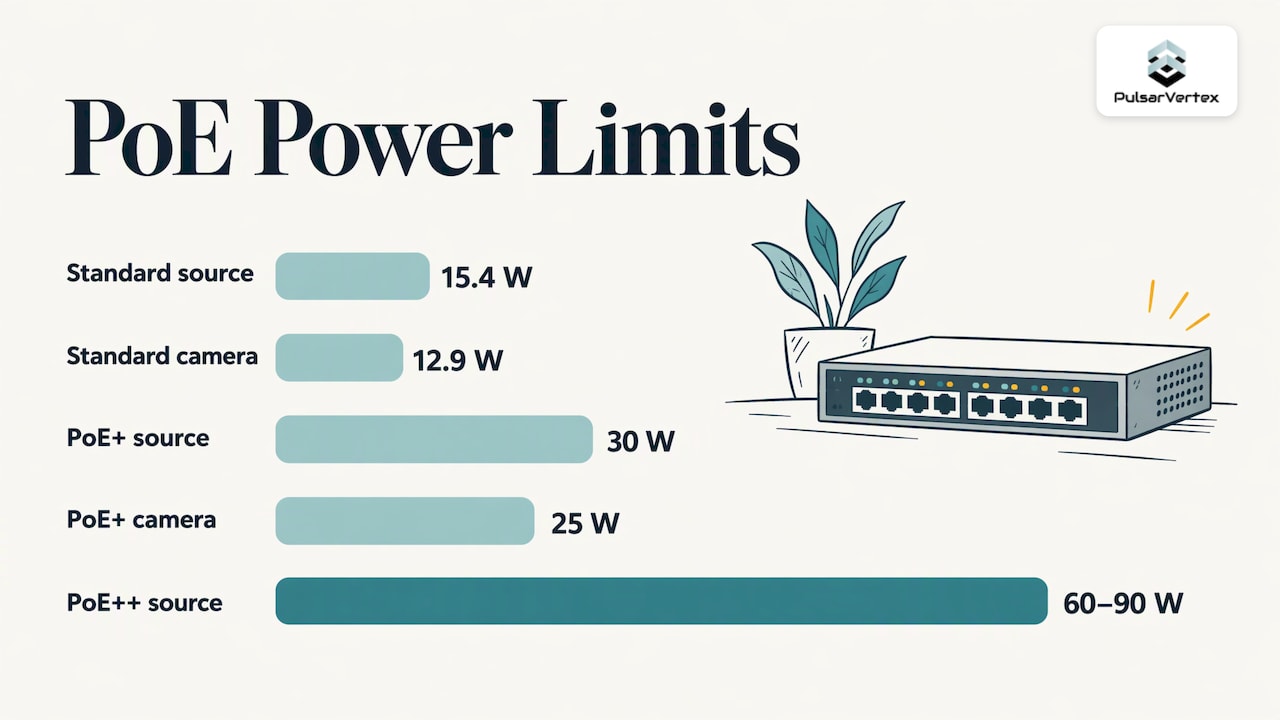
Per-port power. Netgear’s IP surveillance guide states that standard PoE provides up to 15.4W per port, with 12.9W available to the camera. PoE+ provides up to 30W, with 25W available to the camera. It adds that PoE+ is generally required for PTZ cameras, dome cameras and Gigabit Ethernet cameras. Heavier devices, such as cameras with heaters and some multi-sensor units, can need the higher PoE++ (802.3bt) class. TP-Link Omada’s standards overview puts this at up to 60W or 90W at the source.
Total switch budget. A 24-port switch rated for a given total wattage does not deliver that wattage on every port. The total is shared across all active ports. If the combined camera load goes over it, cameras can reboot or fail to power up.
A simple worked example shows the method. Suppose a warehouse plan has 16 fixed cameras at 8W each, 4 PTZ cameras at 25W each and 2 cameras with heaters at 20W each:
| Camera group | Quantity | Draw each | Subtotal |
|---|---|---|---|
| Fixed bullet or dome | 16 | 8W | 128W |
| PTZ | 4 | 25W | 100W |
| Heated outdoor | 2 | 20W | 40W |
| Total load | 22 | 268W |
These wattages are illustrative. Always use the figures from the datasheets of the cameras you choose. Then leave generous headroom above the total, so the switch is not running at its limit on a cold night when heaters and IR illuminators are on. A common rule of thumb is 20 to 30 percent spare capacity, which on this example points to a switch budget of roughly 325W to 350W or more.
Cable distance and layout
Standard Ethernet is limited to 328 feet (100 meters) per segment. Hanwha Vision’s PoE guide lists flexible placement where no power is nearby as one of the main benefits. In practice, the layout questions are:
- Where do the long runs fall? Perimeter fences, yards, parking lots and far corners of large buildings often exceed 328 feet from the main equipment room.
- Can a switch move closer? Putting a small PoE switch in a secondary cabinet, fed by fiber from the main room, is a standard solution for large sites. We install structured cabling and fiber-optic networks for exactly this purpose.
- Are the outdoor runs protected? Outdoor connections need weatherproofing and appropriate conduit. In areas with frequent lightning, such as Florida, ask your installer about surge protection on outdoor camera lines.
Mounting height matters too. Spot AI’s guide recommends mounting PoE cameras around 7 to 10 feet above the ground for general coverage, which keeps them out of easy reach while still capturing useful detail.
Benefits for commercial and industrial sites
Why do so many businesses specify PoE? The main reasons:
- Simpler installation. One cable per camera reduces cable clutter and setup time. Hanwha Vision also notes that Ethernet is less prone to interference than wireless.
- Placement freedom. Cameras can go where there is no outlet, such as light poles, building corners, roof edges and loading docks.
- Centralized power. With power coming from the switch or NVR, a single UPS can keep the whole system recording during an outage.
- Scalability. New cameras join the existing network, as long as ports, power budget and storage have room.
- Local recording. Footage stays on equipment you control, without a mandatory monthly cloud plan.
Planning and selecting a system
Before comparing models, define what each camera must achieve. Is it identifying a face at a door, reading a license plate at a gate, or watching a wide yard for movement? CCTV Security Pros makes a useful point: a well-placed 4MP camera can serve a close overview better than a poorly placed 4K camera covering too much area. The goal is usable recorded detail, not the highest specification everywhere.
A planning checklist:
- Walk the site and mark entrances, loading areas, cash points, stock areas and blind spots.
- Assign a purpose to each camera position: detect, observe, recognize or identify.
- Count channels and add spare capacity for expansion.
- Calculate storage. Retention days, resolution, frame rate and compression decide disk size. Keep in mind any retention requirements from your insurer or your own policy.
- Measure cable runs and decide where switches will sit.
- Total the power budget with headroom, as shown above.
- Decide on remote access and monitoring, and who will respond to alerts.
- Plan integration with access control, alarms and intercoms so one platform can show everything.
If you need more help with camera types, our commercial CCTV cameras guide walks through bullet, dome and other styles and where each fits. For sites with video analytics, see our page on commercial CCTV with advanced video analytics.
Securing the camera network
A PoE camera is a network device, so it needs the same care as any computer. Weakly protected cameras can be a way into the rest of your network. The risks are mostly ordinary ones: factory-default credentials, old firmware and cameras sharing a flat network with office computers or industrial controls.
Safe-use practices we build into installations:
- Change every default password during commissioning, and use unique credentials per device or role.
- Keep firmware updated on cameras, NVRs and switches as part of a scheduled maintenance plan.
- Separate the camera network from business computers, using a dedicated VLAN on managed switches.
- Do not expose the NVR directly to the internet. Use a secure remote access method instead.
- Disable unused services and unused switch ports.
- Protect admin accounts with multi-factor sign-in. If your IT team is writing a policy for hardware keys, this guide to physical security key policy is a starting point for the account side of the system.
Managed switches give you VLANs, port security and logging. They are worth the modest extra cost on any commercial camera network.
Perspective
We have installed integrated fire and security systems for more than 20 years, and the PoE projects that go smoothly all start the same way: with the site, not the catalog.
A camera list is easy to write. The harder questions are where the cable will actually run, what the switch can power in winter, how long footage must be kept, and who will look after the network once we leave. We answer those during planning, because a system sized correctly on paper is the one that stays online.
We also prefer to treat video as one part of a wider security design. Cameras tie into access control, perimeter detection and alarms, and the cabling and network behind them need to be planned once, for all of it. That is why we offer bespoke installation rather than a fixed package, and why we pair it with regular maintenance. Compliance, secure configuration and proactive service are part of the job, not extras.
Pulsar Vertex
How Pulsar Vertex USA can help
Pulsar Vertex Fire & Security Innovations designs and installs CCTV for commercial, industrial, agricultural and educational facilities, including AI-powered video surveillance, thermal CCTV, ANPR and perimeter detection. We also handle structured cabling, fiber-optic networks and commercial Wi-Fi infrastructure, so one team can plan the cameras and the network that carries them. Remote CCTV monitoring and 24/7 maintenance and repairs are available.
See our professional CCTV installation services or, if your site is in Florida, our commercial CCTV installation guide for offices and warehouses. For a warehouse or yard, read how to protect your warehouse revenue with advanced security.
Scaling, integrating and maintaining the system
A PoE system grows by adding cameras and monitoring stations to the existing network. Pelco’s overview notes that cameras with open APIs can integrate with compatible access control, HVAC, alarm and IoT systems. It also reminds buyers to budget for installation and maintenance, including regular servicing by outside vendors.
To leave room for growth:
- Specify an NVR with spare channels and disk bays.
- Choose switches with free ports and spare power budget.
- Pull extra cable to key locations during the first installation, when walls and ceilings are already open.
- Document camera names, IP addresses, ports and cable labels, so changes later take minutes rather than hours.
- Schedule routine checks of lenses, housings, storage health, firmware and time sync.
Maintenance is where many systems quietly fail: a dirty lens, a full disk or a switch running at its power limit. A service agreement catches these before an incident does.
FAQ
What is the disadvantage of a PoE camera?
The main limits to plan for are the 328-foot cable run, the switch’s total power budget and network security. Each has a straightforward answer: add a switch or fiber link for distance, calculate the load with headroom, and use managed switches, strong passwords and current firmware. A well-planned installation handles all three from the start.
Is PoE better for security cameras than Wi-Fi?
For business sites, wired PoE is usually the more dependable choice. The cable carries power and video together, so each camera does not depend on a nearby outlet or a wireless signal. Ethernet is also less prone to interference than wireless, as Hanwha Vision notes.
Do PoE cameras work without internet?
Yes, for recording. Video moves over your local wired network to the NVR, which stores it on its own drives. Internet access is only needed for remote viewing and alerts away from the site.
How many cameras can one PoE switch or NVR support?
It depends on both the number of ports and the power budget. A 16-port switch may not be able to power 16 PTZ or heated cameras at once. Add up the camera datasheet figures, then choose a switch with headroom. Larger sites often use several switches.
Sources
- What Is a PoE Security Camera? (Tapo)
- The Beginner’s Guide to PoE Camera Systems (CCTV Camera World)
- Commercial Security Camera Systems: A Complete Strategy (CCTV Security Pros)
- Networking Solutions for IP Surveillance (Netgear)
- PoE vs. PoE+ vs. PoE++: Power over Ethernet Standards (TP-Link Omada)
- PoE Camera: Definition, Benefits, and Applications (Hanwha Vision)
- 2025 Power over Ethernet (PoE) Security Camera Systems (Spot AI)
- What is a PoE Camera? The Complete Beginner’s Guide (Pelco)
- Physical security key policy
Ready to plan your PoE camera system? Tell Pulsar Vertex USA about your site, and we will design a tailored, integrated system and maintain it afterward. Contact us through our website to request a site assessment.