
Mobile access control lets people open doors, gates and elevators with a smartphone or smartwatch instead of a key card, fob or metal key. The phone holds a digital credential, a compatible reader checks it, and the access control system decides whether to unlock the door. For a business, the real questions are which credential type to use, how to protect it, and how to roll it out without disrupting staff. This guide covers all three from the viewpoint of an installer.
TL;DR
- Mobile access control stores a digital credential on a phone or wearable. It is checked by a mobile-capable reader, usually over Bluetooth or NFC.
- It replaces or sits alongside cards and fobs, so many sites run both during a transition.
- Security depends on the design: encrypted credentials, fast revocation when a phone is lost, and a clear policy on personal devices.
- Plan around readers, controllers, your user directory and your doors, not only the app.
- Pulsar Vertex USA designs and installs access control around the building, not around a single product.
What mobile access control is
IFSEC Global describes mobile access control as a way of giving people authorized entry to a site, building or room through a digital credential on a smartphone or other wearable technology. The “mobile” part is simply that the phone takes the place of the traditional key, badge or fob.
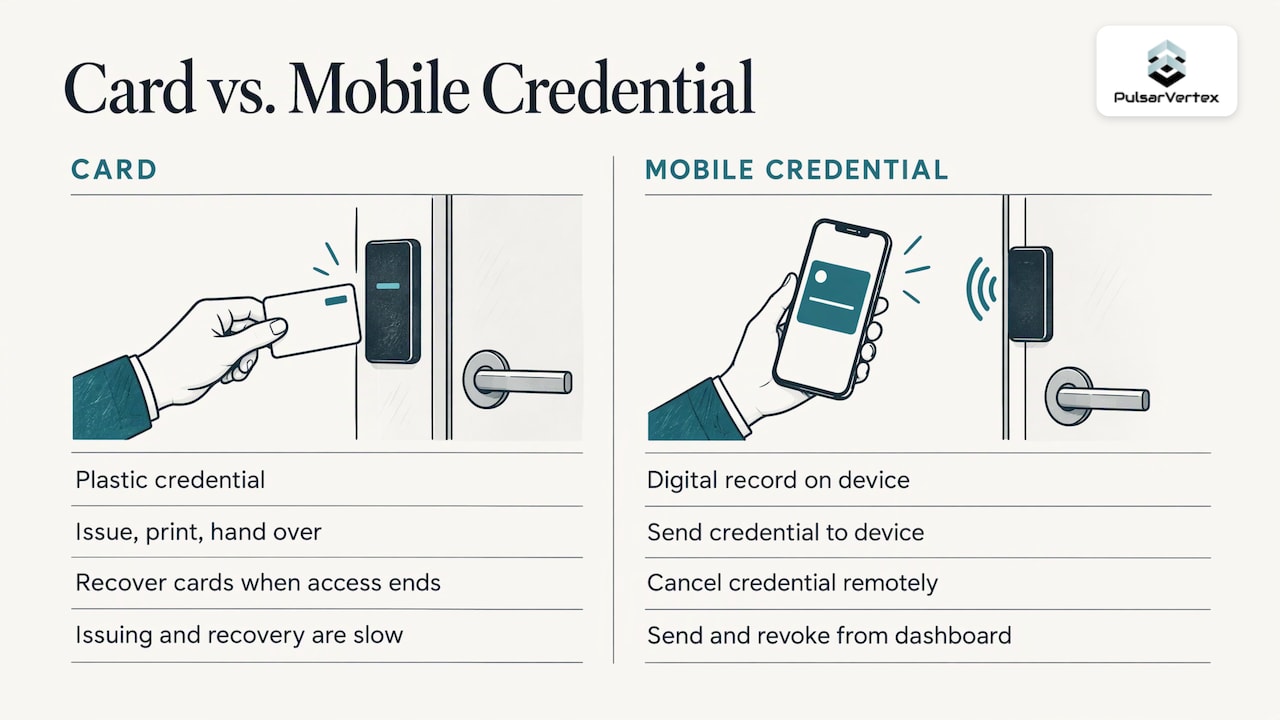
Nothing about the underlying logic changes. Your access control system still answers the same questions: who is this person, which door are they at, and are they allowed in at this time. What changes is the object that carries the identity. A card is a piece of plastic that you issue, print, hand over and collect. A mobile credential is a digital record that you send to a person’s device and cancel remotely.
That difference matters most for businesses with many tenants, contractors, visitors or sites. Issuing and recovering cards for those groups is slow. Sending and revoking a credential from a dashboard is not.
How a phone becomes a key
A working mobile access setup has four parts:
- The credential. A digital key tied to a user, held in an app or in the phone’s digital wallet.
- The reader. Hardware at the door that can talk to a phone. It may be a dedicated mobile-capable reader or a multi-technology reader that also accepts cards.
- The controller or cloud service. The decision-maker. It holds the access rules and tells the door hardware to release.
- The entry hardware. An electric strike, magnetic lock, gate operator or turnstile, with the door position sensing and exit devices that go with it.
IFSEC Global explains that the system typically works through a downloadable mobile app that acts as a virtual key. In many cases it runs over Bluetooth, where the phone talks to a mobile-capable reader. Wi-Fi and NFC are other methods.
Why the reader matters more than the app
Buyers often start by comparing apps. We would start at the door. The reader decides which credential types you can accept today and which you can add later. A reader that supports several technologies lets you move one department or one building at a time, and lets existing card holders keep working while the rest of the team switches to phones.
Bluetooth, NFC and wallet credentials compared
The communication method changes how the user experience feels and how the credential is stored.
| Method | How the user opens a door | Typical strengths | What to plan for |
|---|---|---|---|
| Bluetooth app credential | Phone in pocket or hand, within range of the reader | Convenient at gates, garages and doors where users approach quickly | Reader range settings, so doors open only when the person is actually at the door |
| NFC wallet credential | Phone or watch held against the reader | Deliberate, close-range tap with no app to open in many setups | Phone model and operating system support across your workforce |
| Wi-Fi or cloud-based unlock | App sends an unlock request through a network | Remote unlock for managed doors and deliveries | Reliable connectivity at the door and a fallback if it drops |
| Card or fob (kept in parallel) | Present the card | Works for people without a suitable phone | Ongoing issuing, loss and replacement handling |
ASIS Online describes mobile credentials as digital wallet-based NFC passes that replace physical badges, fobs or keys and live on an employee’s or visitor’s phone or smartwatch. It also notes that with NFC the device is held very close to the reader, about 2 centimeters (under an inch), so the device communicates with the reader and allows authenticated passage. That short distance is a feature: a tap is a clear, intentional act.
What the credential actually is
The phrase “access control credentials” covers anything that proves identity to a reader: a card number, a PIN, a biometric template, or a certificate. On a phone, the credential is usually a cryptographic record rather than a simple number.
That is a meaningful security step. The Secure Tech Alliance explains that asymmetric key pairs can be generated on the mobile device by an app, with only the public key shared outside the device. The private key never has to leave the phone.
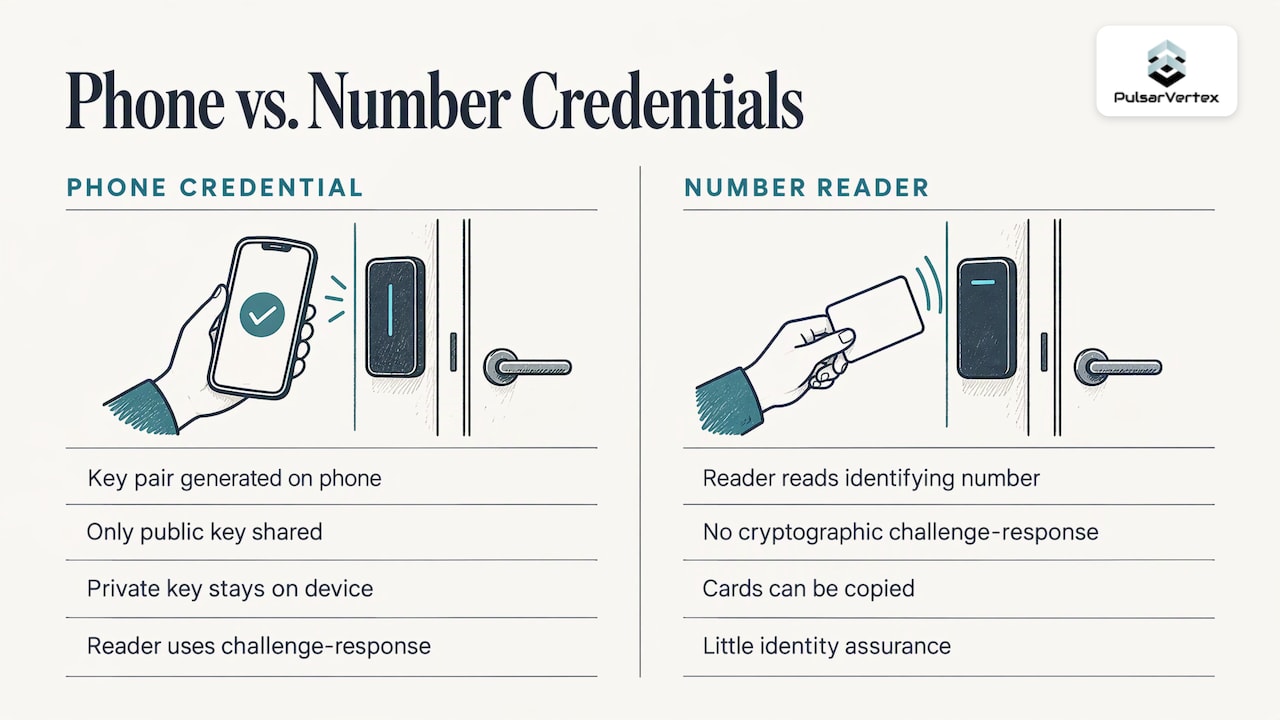
Contrast that with older systems. NIST’s guidance on using PIV credentials for physical access points out that some readers read an identifying number without any cryptographic challenge and response. In that case cards can be copied and the reader gets little or no assurance of who is presenting them. That publication dates from 2008, and the weakness it describes is a reason many organizations look at credentials with stronger authentication.
Federal environments go a step further. The Secure Tech Alliance notes that digital certificates can support physical access use cases, with examples such as derived PIV credentials and mobile driver’s licenses. Most commercial buildings will not need that level, but it shows where the technology is heading.
Why businesses move to mobile credentials
Faster administration
Issuing a credential becomes a dashboard task. A new hire, a cleaning contractor or a visiting engineer can receive access before they arrive, and it can be cancelled the moment the contract ends. There is no card to print, post or chase.
Fewer lost cards and less waste
People rarely leave their phone at home. Lost-card replacement, a constant minor cost on large sites, shrinks when the phone is the key.
Better control across sites
When doors report to one platform, a property manager can see and change permissions across several buildings without visiting each one. That fits multi-tenant offices, schools, warehouses and agricultural or industrial estates with several gates.
Flexible visitor and contractor access
Time-limited credentials suit visitors and trades. You can restrict them to certain doors and hours, and the access expires on its own.
A path from cards, not a replacement overnight
Because mobile-capable readers can also read cards, you can migrate in phases. Our commercial key fob and key card access control installations are often the first stage of this path, with readers chosen so mobile credentials can be switched on later.
Security: what to get right
A phone is a convenient key, and it needs a plan around loss and theft. The Canadian Centre for Cyber Security states that loss or theft of mobile devices can create risk because threat actors may compromise the device and gain access to systems and data. Its mobility guidance recommends encrypted communications and storage, remote wipe for lost or stolen devices, device authentication before access to resources, restriction of third-party apps, and monitoring for policy violations.
Translated into a door security policy, that means:
- Require a screen lock. The credential should not be usable on an unlocked, unattended phone for long.
- Make revocation fast and owned. Decide who can cancel a credential, how an employee reports a lost phone, and how quickly the change reaches every door. The Hong Kong Digital Policy Office’s mobile security guide notes that mobile devices are more likely to be lost or stolen than other devices, and advises remote lock when a device is believed lost or left unsecured.
- Tie credentials to identity records. NIST’s physical access guidance states that a derived PIV credential used for physical access must be invalidated when the associated identity account is terminated, or when the device holding it is lost or compromised. It also describes removing the credential from access control lists. The same principle is good practice for any business: when HR ends an account, the door access ends too.
- Keep multi-site revocation in mind. NIST also notes validity and revocation challenges across multi-site systems, so confirm that every controller receives updates promptly.
- Store as little personal data as needed. The Secure Tech Alliance advises that identifying data on a device, such as a username, organization, facial image or fingerprint, should be kept to a minimum and included only as security and privacy policies require.
Connected systems, connected risks
Once doors depend on software, building security and IT security overlap. IFSEC Global points out that a centralized system could be hacked, compromising access and user information, as with other digital or electronic access management systems. That is a reason to treat the access platform like any other business system: strong administrator authentication, patching and logging. For a wider view of how physical and digital threats interact, see this overview of physical and cyber convergence risks.
Privacy and personal phones
Employees care about what an employer can see on their own phone. ASIS Online notes that some people are reluctant to store an employee badge on a personal device, and reluctant to install corporate apps or sign in with work credentials.
There is a practical answer. ASIS reports that organizations can address these concerns with wallet-based credentials that live in a secure element on the phone, which does not share data with online apps or cloud software. Offering a wallet option, being clear about what the system records, and keeping a card or company-issued device as an alternative will make adoption smoother.
IFSEC Global also lists the cost of upgrading to a mobile-enabled system among the commonly cited hurdles, citing 38% of respondents in an IFSEC Insider report. Phased migration and readers that support both cards and phones are the usual way to spread that cost.
How to choose and deploy a mobile access control system
This is the part competitor guides often skip. Work through it in this order.
- Survey the doors. List every door, gate, barrier and elevator. Note which are interior, exterior, high traffic or high risk. Include fire exit paths, because release behavior at fire doors must stay compliant with your local fire code. Your local authority having jurisdiction and your fire alarm contractor can confirm requirements.
- Decide who needs which credential. Staff, tenants, contractors and visitors rarely need the same thing. Map each group to phone, wallet, card or PIN.
- Choose reader technology first. Pick readers that handle the credential types you want in three to five years, not only today.
- Connect to your user directory. Where possible, link the access platform to the system your HR or IT team already uses, so joiners and leavers update access automatically.
- Plan for failure. Decide what happens if the network, power or a phone fails. Doors need a defined fallback that is secure and safe for exit.
- Write the device policy. Cover personal versus company phones, screen locks, lost-device reporting and who can revoke.
- Integrate with video. Linking door events to cameras makes it far quicker to review who entered and when. Our CCTV installation team often designs the two systems together.
- Pilot, then expand. Start with one floor or one site, collect feedback, then roll out. Keep cards active until the last user has moved over.
- Set up maintenance. Firmware, app updates, credential audits and door hardware checks all need an owner and a schedule.
Which sites benefit most
Multi-tenant offices, schools and campuses, gyms and sports clubs, warehouses, construction sites and solar or battery energy sites all have frequent changes of people and several entry points. For sites that already use an office security layout, our page on office security, fire alarms, CCTV and door entry shows how the pieces fit together.
Our perspective
We design access control around how a building is used, and that is why we approach mobile credentials as a system decision rather than an app decision.
After more than 20 years of installing integrated fire and security systems, we see the same pattern. The projects that go well start with the doors, the people who use them and the compliance picture. Readers, controllers, cabling and network all have to support the credential, and the credential has to suit the staff, not the other way round.
That is why we favor mobile-capable readers that also accept existing cards. It lets a business keep what already works, introduce phones where they add most value, and avoid a disruptive cutover. It also keeps the door open for stronger credential types later.
We also treat access control as one layer of a connected site. When doors, CCTV, intruder alarms and fire systems are planned together, an access event can be checked against video, and a fire alarm can release the right doors safely. Because we handle structured cabling, fibre and Wi-Fi as well, we can make sure the network under the readers is as dependable as the readers themselves.
Pulsar Vertex
Let us plan your access control
Pulsar Vertex Fire & Security Innovations designs and installs access control systems for commercial, industrial, agricultural and educational sites, with bespoke installations built around each client’s doors, users and compliance needs. Pulsar Vertex USA can also supply the supporting door entry and video intercom systems, and 24/7 maintenance and repairs once the system is live.
If you are replacing cards, adding a building or starting from scratch, we will walk the site with you, agree the credential approach and design a system that can grow.
FAQ
Can a phone replace every key card in my business?
It can for people who carry a compatible smartphone or smartwatch. Most businesses keep cards or fobs for some users, such as visitors or staff without a suitable device. Mobile-capable readers that also read cards make that mix simple to manage.
What happens if an employee loses their phone?
Your administrator cancels the credential from the access platform, and the change should reach every door. Pair that with a screen lock and remote lock or wipe on the device, as security guidance from government cyber agencies recommends. A clear, fast reporting process matters as much as the technology.
Do employees have to install a company app on their personal phone?
Not necessarily. Wallet-based NFC credentials sit in the phone’s secure element, which ASIS Online says does not share data with online apps or cloud software. Many privacy concerns are addressed by giving staff that option, along with a card or company device where they prefer it.
How close does a phone need to be to the reader?
It depends on the method. With NFC, the phone is held very close to the reader, about 2 centimeters according to ASIS Online. Bluetooth systems work at a longer range, which installers set so doors open only when the user is at the door.
Can mobile access control work with CCTV and alarms?
Yes. Door events can be linked to camera footage and to intruder or fire systems when the site is designed as one integrated system. That makes it quicker to review entries and respond to incidents.
Sources
- A guide to mobile access control systems (IFSEC Global)
- A Mobile Credentials Reality Check (ASIS Online)
- Using Mobile Devices for Physical Access Control (Secure Tech Alliance)
- A Recommendation for the Use of PIV Credentials in Physical Access Control Systems (NIST SP 800-116)
- Physical Access (NIST 800-157r1)
- Securing the enterprise for mobility (Canadian Centre for Cyber Security)
- Practice Guide for Mobile Security (Hong Kong Digital Policy Office)
- Types of Physical Cyber Convergence Risks: 2026 Guide
Ready to upgrade your doors? Contact Pulsar Vertex USA to book a site survey and get a tailored access control proposal.